Actions
Bug #4763
open
DP
BE
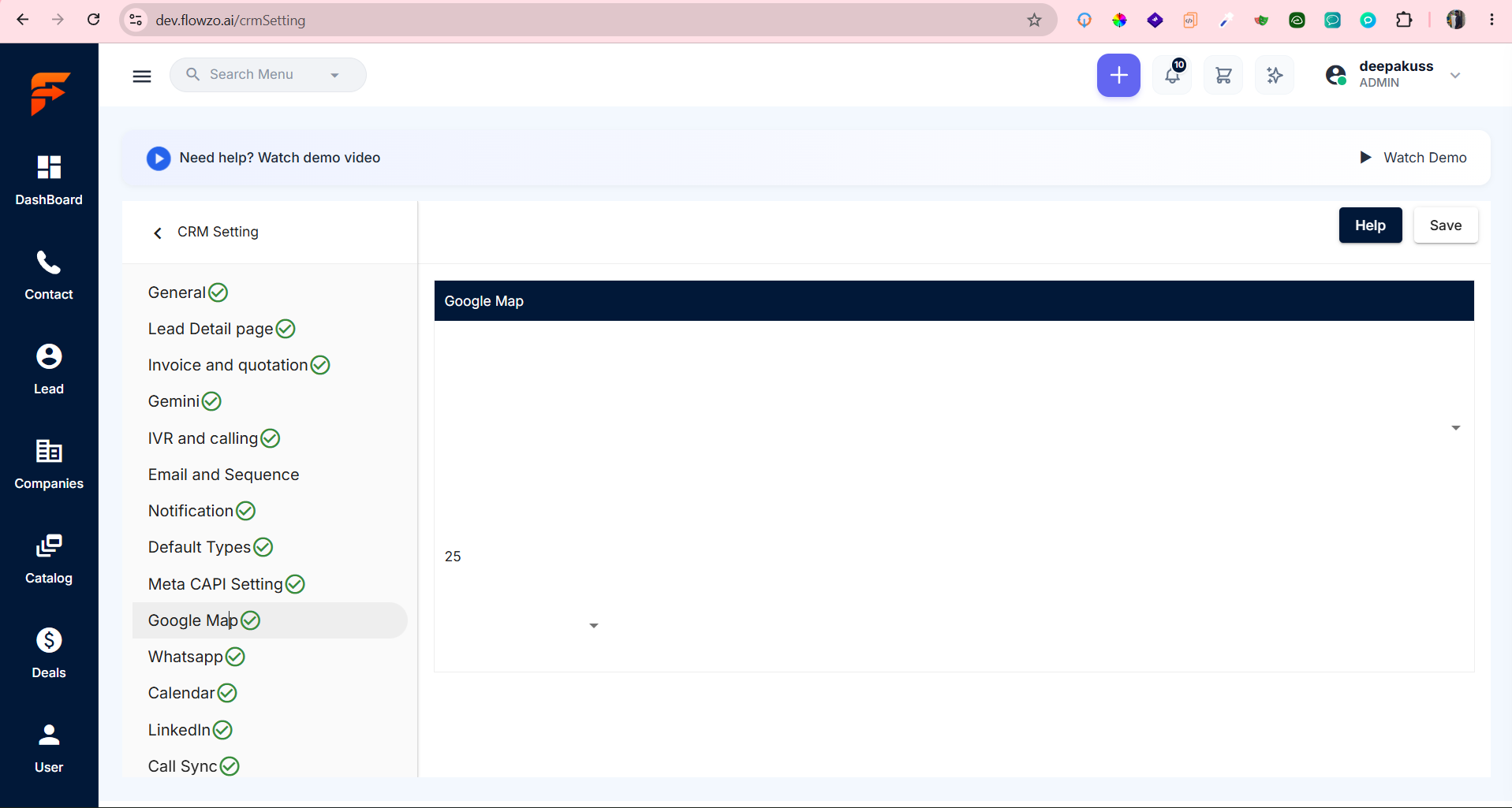
website -->crm setting -->Google Map settings page has alignment issues
Bug #4763:
website -->crm setting -->Google Map settings page has alignment issues
Start date:
Due date:
% Done:
0%
Estimated time:
Description
Preconditions : User should have access to CRM Settings
Steps to Reproduce
- Login to the application.
- Navigate to CRM Settings.
- Select Google Map from the settings menu.
- Verify the alignment of the Google Map section, dropdown, displayed value, and page controls.
- Check the overall page layout and spacing.
https://dev.flowzo.ai/crmSetting
deepakrajsandeep@gmail.com
Welcome@123
Expected :All Google Map settings elements should be properly aligned with consistent spacing, positioning, and layout across the page.
Actual :The Google Map page has overall alignment issues, with the section content, dropdown, value, and other UI elements not positioned/aligned properly.
Files
YV Updated by yeshwanth V about 21 hours ago
- Status changed from New to Resolved
Actions