Bug #4416
closedAPP: Field sales tracking Property name Lead name is not listed while setting up the meeting
Description
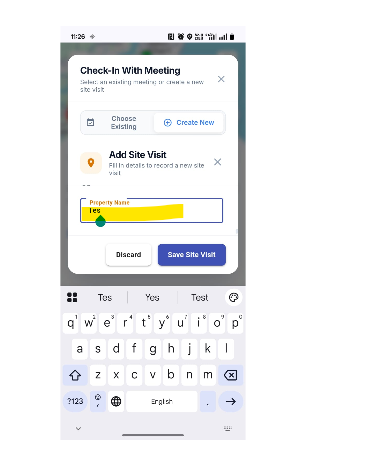
APP – Field Sales Tracking: Lead Name and Property Name Are Not Listed While Setting Up a Meeting
Module: Field Sales Tracking → Meeting Setup
Description:
While setting up a meeting in the Field Sales Tracking module, the Lead Name and Property Name are not displayed in their respective selection lists. As a result, users are unable to select the required lead and property when creating a meeting.
Preconditions:
- User is logged into the Mobile App.
- Lead and Property records exist in the system.
- User has permission to create a meeting.
Steps to Reproduce:
- Launch the Mobile App.
- Log in with valid credentials.
- Navigate to Field Sales Tracking.
- Tap Set Up Meeting.
- Open the Lead Name and Property Name dropdown fields.
Actual Result:
The Lead Name and Property Name are not listed in their respective dropdown fields.
Expected Result:
The application should display all available Lead Names and Property Names in their respective dropdowns to allow users to create a meeting successfully.
username: fstmanager@gmail.com
pwd: Welcome@123
Files